Backup & Recovery
Never Lose Access to Your Secrets
Seedkeeper backs up device-to-device: you scan a Master device and a Backup device together, and the Backup device ends up holding an incremental copy of everything on the Master. This works in any combination - card-to-card, ring-to-ring, card-to-ring, or ring-to-card - and for both Seedkeeper Classic and Seedkeeper PRO. Do this once your Master device holds your real secrets, and again any time you add new ones.
Overview
Seedkeeper has no cloud - your secrets live only on your physical device. That's great for privacy, but it means losing your device without a backup means losing everything on it. It also means no provider can be breached to expose your vault, which is the trade-off explained in Password Manager Explained. Setting up a Backup device takes a few minutes and protects you against a lost, stolen, or damaged device.
The process is the same regardless of form factor or product line: card-to-card, ring-to-ring, or mixing a card with a ring all work, on both Seedkeeper Classic and Seedkeeper PRO.
This article covers backing up your password manager (via the Seedkeeper App). If you also use passkeys or OTP codes, see Passkey Backup Strategy and OTP Backup and Restore Procedures for those.
Step-by-Step Instructions
Step 1: Open Backup in the app
In the Seedkeeper App, tap the 3-dot menu (top right), then Make a Backup.
Step 2: Scan your Master device
This is the card or ring holding the secrets you want to backup.
Step 3: Scan your Backup device
It can be a card or a ring, regardless of what your Master device is. Scanning both devices lets them exchange a shared key through a Diffie-Hellman challenge - this key is used to encrypt the backup.
Step 4: Scan the Master device again
This prepares the backup on the Master device's side.
Step 5: Scan the Backup device again
Hold it against the reader for the entire duration of the copy - don't remove it until the app confirms completion. If it stops partway, see Backup and Restoration Issues. Your Backup device now holds an incremental copy of everything on your Master device.
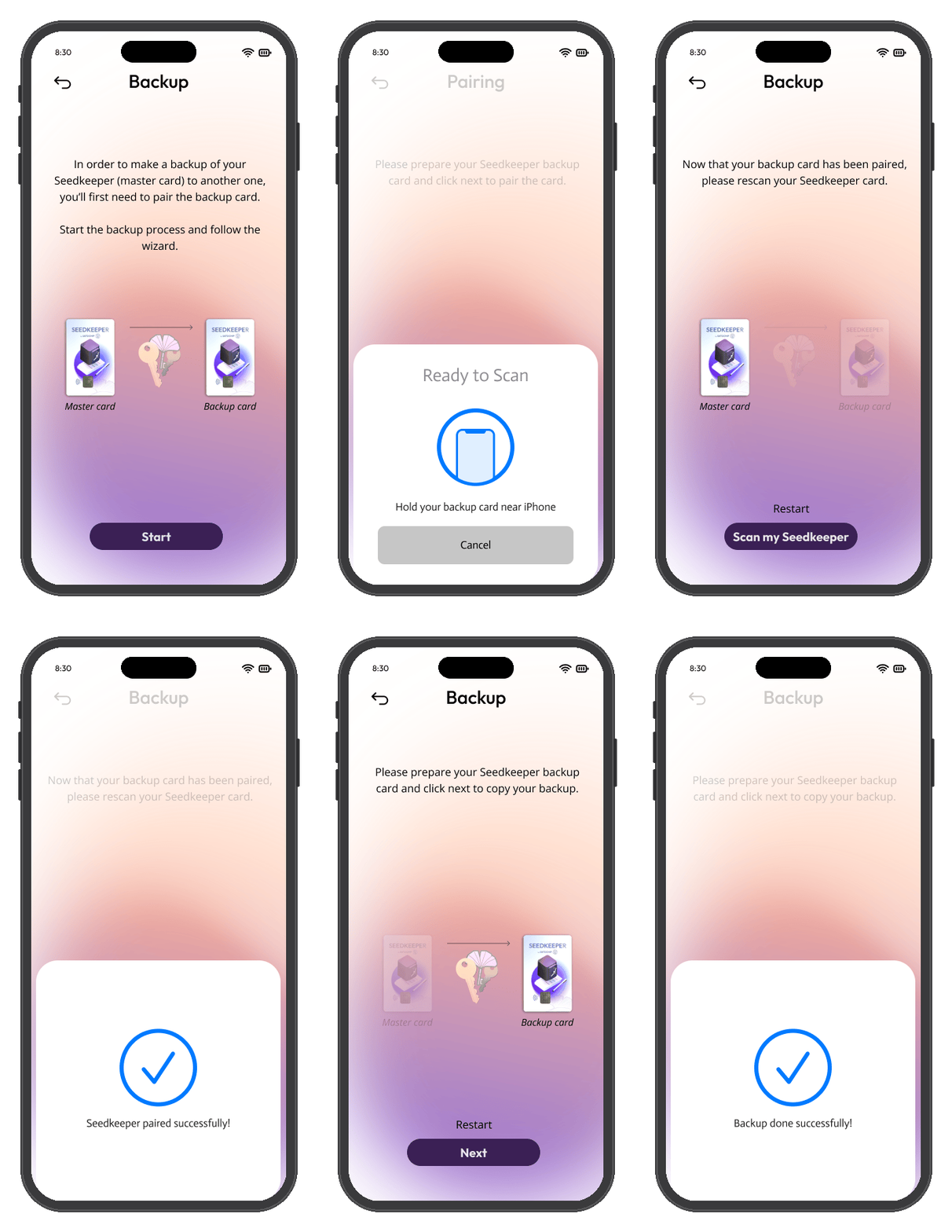
Since the backup is incremental, you can re-run these same steps any time after adding new passwords or notes, without starting over.
FAQ
Do I need a second Seedkeeper device to back up?
Yes. Seedkeeper backs up device-to-device - you need a Master device and a Backup device to complete the process described above.
Does the Backup device need to be the same form factor as the Master?
No. Any combination works: card-to-card, ring-to-ring, card-to-ring, or ring-to-card.
Does this work for both Seedkeeper Classic and Seedkeeper PRO?
Yes, the backup process is identical on both product lines.
Is the backup encrypted?
Yes. The Master and Backup devices exchange a shared key via a Diffie-Hellman challenge during setup, and that key encrypts the backup.
What if I forget my PIN and don't have a backup?
You can still reset your device - see Resetting Your Seedkeeper for the procedure - but this wipes all secrets and returns the device to its factory state, with no way to recover the data.
Does this also back up my passkeys and OTP codes?
No, this covers your password manager. See Passkey Backup Strategy and OTP Backup and Restore Procedures for those.