Creating a New Password
Generate and Store a New Password in Seconds
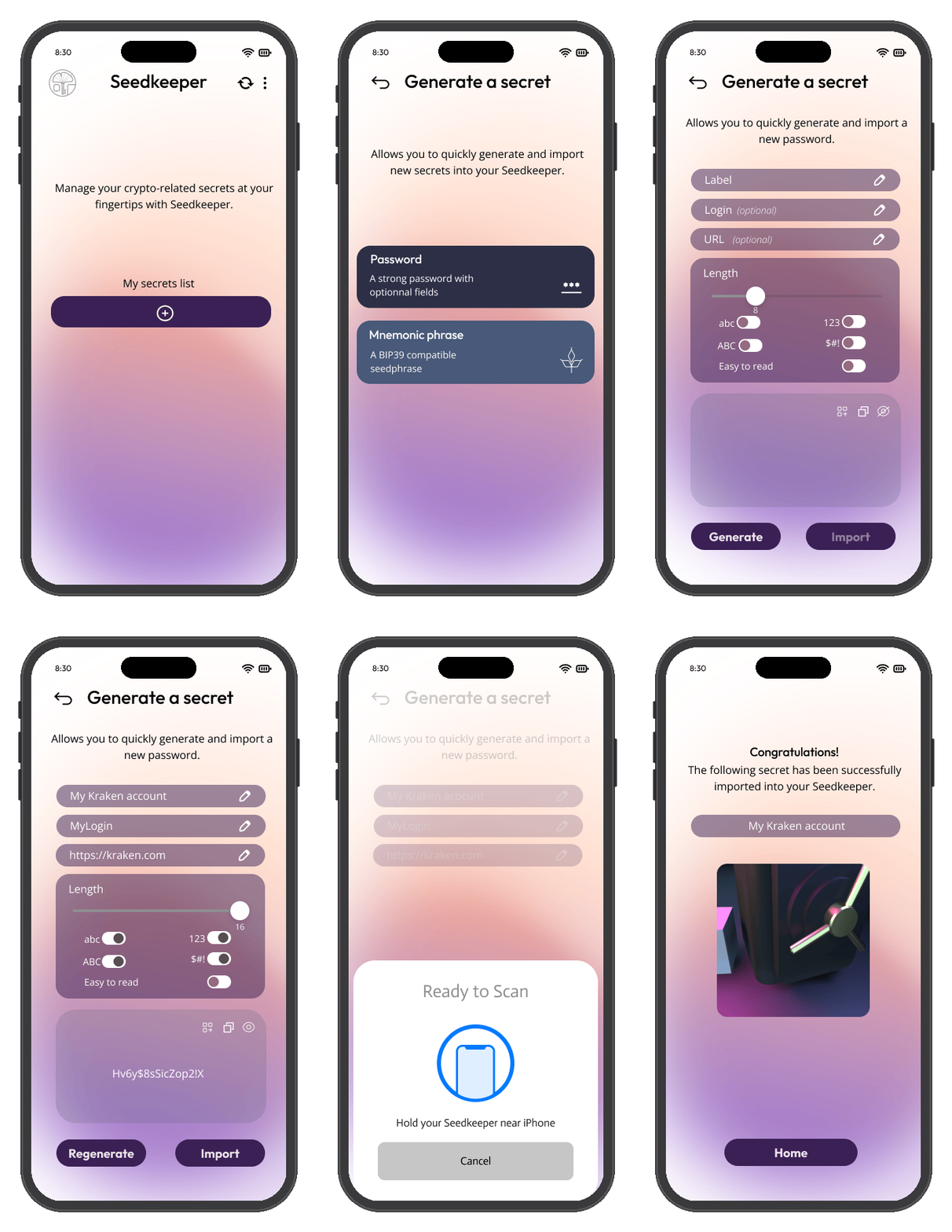
Scan your Seedkeeper, tap Generate a Secret → Password, give it a label, customize the length and style, then generate and save it back to your device.
Overview
The Seedkeeper App generates passwords directly on your device and stores them there - nothing is sent anywhere else. You control the length and style of each password you create.
If you're unsure what to pick, length matters more than complexity rules, and a machine-generated password beats anything you would invent - see What is a Strong Password?.
Step-by-Step Instructions
Step 1: Launch the app and scan your Seedkeeper
Open the Seedkeeper App and scan your card or ring, then enter your personal PIN.
See the First Setup Guide if you haven't set up your PIN yet.
Step 2: Start generating a secret
Tap Generate a Secret, then Password.
Step 3: Label your password
Specify a label - this is what distinguishes this secret from all the others in your list.
Step 4: Add optional details
- Login (optional) - an email address, username, or nickname
- URL (optional) - the site this password is for
Step 5: Choose length and style
Pick the password length and style that suits you:
- Upper case, lower case, symbols - a fully random string from the character sets you enable
- Easy-to-read - a word-based password built from English dictionary words, easier to remember
Step 6: Generate
Tap Generate to see your password.
You can regenerate as many times as you like until you get one you're happy with.
Step 7: Save it to your device
Tap Import, then scan your card or ring again to store the password.
Your new password is now saved on your Seedkeeper.
FAQ
Are the login and URL fields required?
No, both are optional. See Add optional details above.
Can I change the password after generating it?
Yes - regenerate as many times as you like before tapping Import. See Generate above.
Where is my password stored?
Directly on your Seedkeeper device within the EAL6+ certified secure element - there's no cloud involved.
See Introduction for more on how Seedkeeper works.
What's the difference between "Easy to read" and randomized passwords?
"Easy to read" passwords are dictionary-based - built from English words, so they're both easy to read and easy to remember.
Randomized passwords use a charset you specify (upper case, lower case, symbols) instead, which is less memorable but not tied to real words.
See Choose length and style above.