Storing Seed Phrases
Keep Your Seed Phrase Off the Cloud
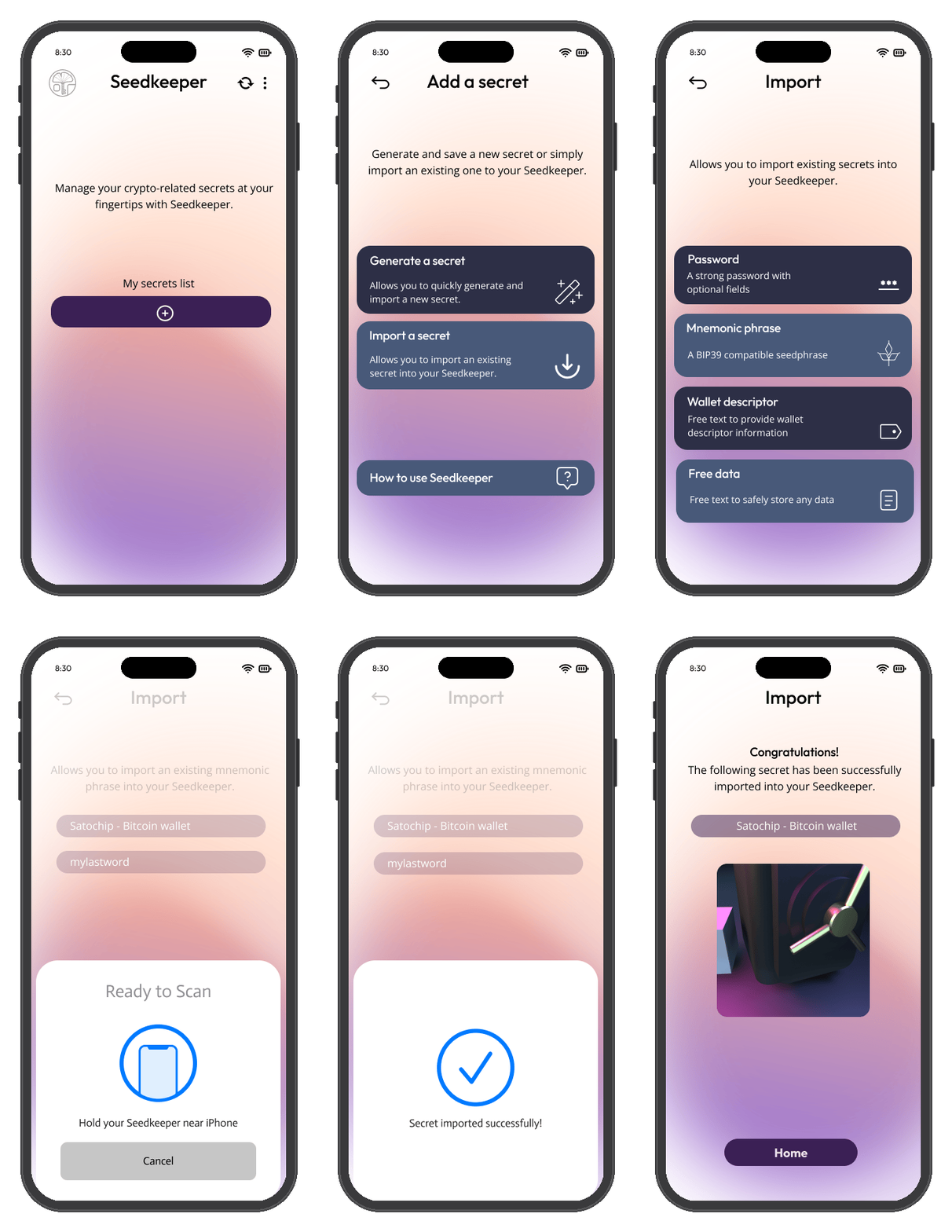
Scan your Seedkeeper, tap Import a Secret → Mnemonic Phrase, give it a label, optionally add a passphrase and wallet descriptor, enter your mnemonic, then save it back to your device.
Overview
Your Seedkeeper can store a seed phrase directly on-device, alongside your passwords and notes - nothing is sent anywhere else. Unlike a password, a seed phrase cannot be changed if it leaks: whoever holds it holds the funds, permanently. That makes offline storage the whole point.
If you're new to seed phrases, What is a Seed Phrase? covers what those words actually encode, and How to Securely Store a Seed Phrase covers the storage decisions around this one.
Step-by-Step Instructions
Step 1: Launch the app and scan your Seedkeeper
Open the Seedkeeper App and scan your card or ring, then enter your personal PIN.
See the First Setup Guide if you haven't set up your PIN yet.
Step 2: Start importing a secret
Tap Import a Secret, then Mnemonic Phrase.
Step 3: Label your seed phrase
Specify a label - this is what distinguishes this secret from all the others in your list.
Step 4: Add optional details
- Passphrase (optional)
- Wallet Descriptor (optional)
Step 5: Enter your mnemonic
Type in your seed phrase.
Step 6: Save it to your device
Tap Import, then scan your card or ring again to store it. Your seed phrase is now saved on your Seedkeeper.
Your seed phrase must be BIP39-compliant. The app verifies it using the checksum defined by the BIP39 standard - if it doesn't check out, the app will prompt you that it's invalid. Double-check every word, the word order, and that you've typed the full phrase.
For a phrase that isn't BIP39 - an Electrum seed, a Monero 25-word phrase, a raw private key - store it as a secure note instead. Same secure element, same PIN, without the format check.
If the app rejects a phrase you believe is correct, Import Errors lists what to check, in order.
FAQ
What if the app says my seed phrase is invalid?
Do I need to add a passphrase or wallet descriptor?
No, both are optional. See Add optional details above.
What is a passphrase?
An optional extra word or phrase added on top of your seed phrase for additional security. See the glossary entry for details.
Where is my seed phrase stored?
Directly on your Seedkeeper device - there's no cloud involved. See Introduction for more on how Seedkeeper works.