Common Password Attacks
The Ways In, From Most Common to Least
Most stolen passwords aren't "hacked" in the dramatic sense - they're guessed, leaked in a breach elsewhere, handed over through a fake login page, or simply asked for over the phone. Here's how each one actually works, roughly in order of how often it happens.
Brute Force and Dictionary Attacks
The most basic approach: a program simply tries password after password until one works. A pure brute force attack tries every possible combination; a dictionary attack is smarter, starting with real words, common patterns, and previously leaked passwords, since people are predictable.
This is precisely why length and randomness matter so much - see What is a Strong Password?. A short, common password can fall in seconds; a long, random one can remain out of reach for centuries with the same hardware.
Data Breaches and Credential Stuffing
Rather than cracking anything, attackers often just wait for someone else to do the work: a company gets breached, and millions of email-and-password pairs end up circulating. From there, those same credentials get tried automatically against other services, a technique called credential stuffing.
This is the single biggest reason password reuse is dangerous - see Why Password Reuse is Dangerous for exactly how this plays out.
Phishing: Email and Fake Websites
Phishing skips cracking or leaking entirely - it just asks you for your password, disguised as something legitimate. A convincing email claims your account needs "urgent verification," links to a fake login page that looks identical to the real one, and captures whatever you type.
Modern phishing kits can clone a login page pixel-for-pixel, and some can even intercept two-factor codes in real time. This is exactly the weakness passkeys are designed to close: a passkey is cryptographically tied to the real website's address, so it simply doesn't work on a lookalike site, no matter how convincing it looks. See What is a Passkey?.
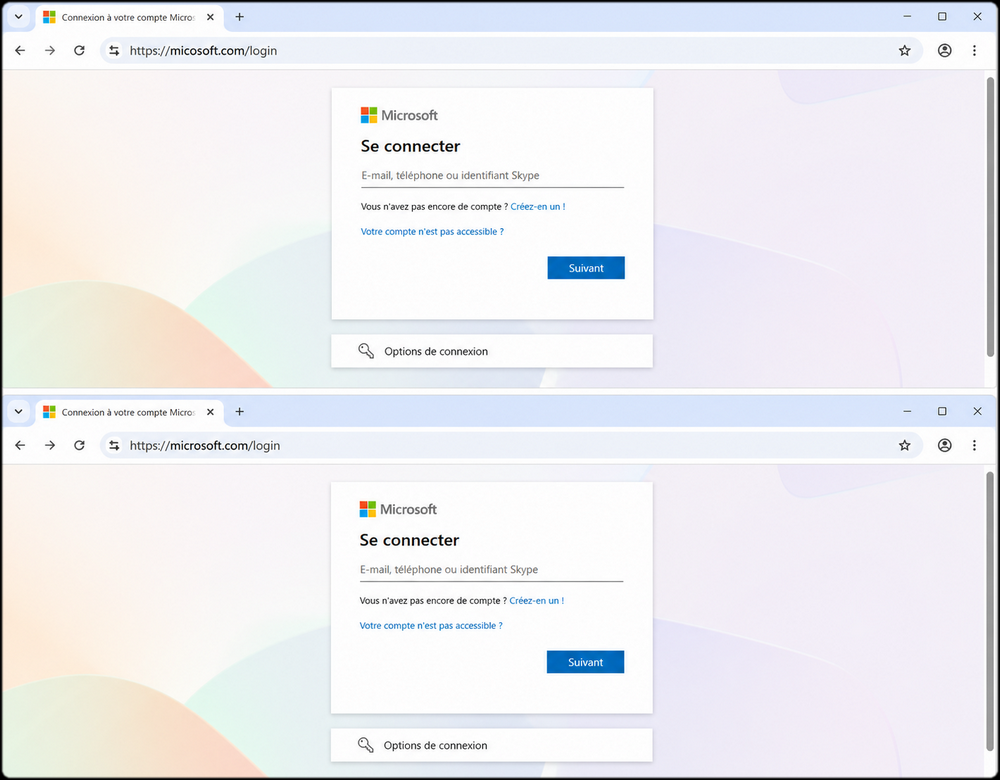
Can you spot which of these two pages is trying to steal your Microsoft 365 credentials?
Show the answer
The first one on top. The page itself is a perfect copy - same logo, same layout, same buttons, same padlock. The only difference is in the address bar: micosoft.com instead of microsoft.com. One missing letter.
This is called a lookalike or typosquatted domain, and it's the single hardest thing to catch by eye, especially on a phone where the address bar is truncated. Note that the padlock icon proves nothing here: it only means the connection is encrypted, and anyone can get a certificate for a domain they own, including an attacker.
A passkey would not have been fooled. Your device checks the domain character by character before signing anything, and refuses to respond to a domain it wasn't registered for. There is no prompt to dismiss and no judgment call to make.
Network Sniffing on Public Wi-Fi
An open Wi-Fi network - the kind with no password, common in airports, cafes, and hotels - lets anyone else on that same network potentially intercept unencrypted traffic passing through it. If you log in to a site that isn't properly encrypted (or an attacker manages to trick your device into a fake "captive portal" page mimicking the real one), your password can be captured in transit without you noticing anything wrong.
Most modern websites use encryption (HTTPS) that protects against basic sniffing, but the fake-portal trick specifically targets the moment before that protection kicks in.
Social Engineering
This is the one that skips technology almost entirely - and it's become increasingly common because it's often easier than any technical attack. Social engineering means manipulating a person into handing over access voluntarily.
A typical version: someone calls claiming to be IT support, sounding calm and official, saying there's "unusual activity" on your account and they need to "verify" you - which really means walking you through reading out a password or a one-time code. Another version arrives as an urgent message from a "colleague" or "boss," pressuring you to act fast before you have time to think it through. Both rely on the same thing: creating urgency or authority so you skip your normal caution.
No password strength or technology defends against this - the only real defense is a habit: legitimate IT support and services never need you to read them your password or a one-time code out loud. If someone's asking for it, that's the red flag.
Other Attack Vectors
A few less common but still real methods round out the picture:
- Keyloggers and malware - software quietly installed on your device that records everything you type, including passwords, before you ever hit submit.
- Shoulder surfing - someone simply watching you type your password, in person or over video.
- SIM swapping - an attacker convinces your mobile carrier to transfer your phone number to their own SIM card, letting them intercept SMS-based verification codes. This is the single strongest argument against SMS as a second factor - see SMS vs TOTP.
What This Means for an Organisation
Every attack above is a personal risk and a corporate one, because the credentials involved are rarely confined to one side of that line.
Phishing and credential stuffing are consistently among the most common entry points in reported incidents, and they are why the EU's NIS2 directive places authentication and access control among the risk-management measures that in-scope entities must adopt under Article 21(2). The same directive imposes short reporting deadlines once an incident is detected - an early warning within 24 hours - which changes the calculation: an attack that succeeds is no longer only an operational problem but a regulatory one, on a clock.
The attacks that matter most here are the two that no amount of password hygiene addresses. Phishing and social engineering both target the person, not the password, which is why the durable answer is authentication that cannot be handed over: see Are Passkeys Safer? and Passkeys and NIS2.
How to Actually Protect Yourself
Most of these attacks share a common thread: they target something you know (a password) or something you have that can be redirected (like SMS codes). The strongest response combines a few things:
- Long, unique, generated passwords for anything a brute-force or breach could target - see Password Manager Explained.
- Passkeys where available, since they're immune to phishing and can't be reused across sites by design - see Passkey vs Password.
- Phishing-resistant MFA on anything privileged, remembering that a one-time code can be relayed in real time and a passkey cannot - see Passkey vs OTP.
- A healthy suspicion of urgency - phishing and social engineering both rely on rushing you.
- Avoiding sensitive logins on open Wi-Fi, or using a VPN if you have no choice.
FAQ
What's the difference between a data breach and phishing?
A breach happens to the company; phishing happens to you directly, through a fake message or website. See Data Breaches and Credential Stuffing and Phishing: Email and Fake Websites above.
Can a strong password protect me from phishing?
No - if you type it into a fake page, its strength doesn't matter, since you handed it over willingly. Passkeys, not password strength, are what defends against this. See Phishing: Email and Fake Websites above.
Is public Wi-Fi always dangerous?
Not always - most login pages are encrypted by default - but it removes a layer of protection you'd otherwise have, especially against fake captive portal tricks. See Network Sniffing on Public Wi-Fi above.
Why is social engineering becoming more common?
Because it's often easier than any technical attack - it targets human trust and urgency rather than a system's defenses, which no password strength can fix. See Social Engineering above.