How to Replace Passwords with Passkeys on Outlook
Remove Your Password Entirely, Not Just Skip It
Web
Unlike some services, Microsoft lets you remove your account password entirely. Turn on "Passwordless account" in your security settings, and your Seedkeeper PRO passkey becomes the only way in.
Overview
Once you have a Seedkeeper PRO passkey set up on your Microsoft account, you can go a step further than most services allow: Microsoft's Passwordless account option removes your password from the account entirely, rather than just making the passkey the default.
This guide assumes you've already set up a passkey with your Seedkeeper PRO. If you haven't, see How to Enable Passkeys on Outlook first.
Before changing anything, it is worth understanding what this actually buys you: a passkey cannot be phished, cannot be leaked in a breach, and cannot be reused across sites, because there is no shared secret at any point. See Passkey vs Password for the full comparison, and Are Passkeys Safer? for the caveats worth knowing first.
Step-by-Step Instructions
Step 1: Go to Advanced Security Options
Open Microsoft account Advanced Security Options.
Step 2: Sign in
Sign in with the Microsoft account you use for Outlook.
Step 3: Find Additional security
Under your sign-in or security methods, find the Additional security section.
Step 4: Turn on Passwordless account
Next to Passwordless account (shown as OFF), click Turn on.
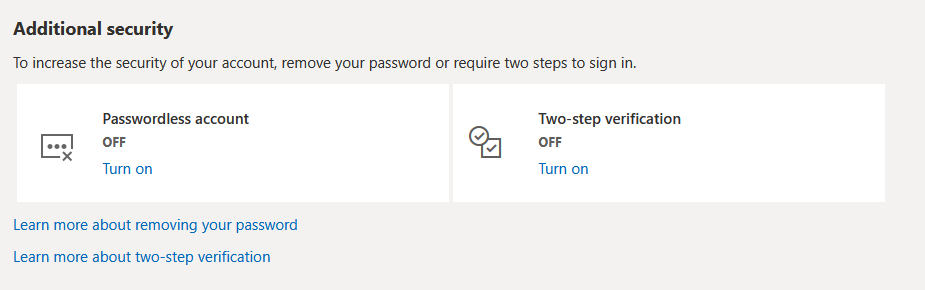
Your Microsoft account no longer has a password - your Seedkeeper PRO passkey is now the way you sign in.
Official Microsoft Resources
FAQ
Can I turn my password back on later?
Microsoft's passwordless setting can typically be reverted from the same Additional security section if you need to.
Is this different from how Google handles this?
Yes. Google doesn't currently offer full password removal - see How to Replace Passwords with Passkeys on Google for that comparison.
What if I lose my Seedkeeper PRO after going passwordless?
Make sure you have a backup device registered first - see Passkey Backup Strategy.
Is going passwordless actually safer?
Yes, on every attack that compromises accounts in practice - phishing, credential stuffing, breach exposure and reuse all stop applying. The one thing to plan first is recovery: register a second device before you rely on a single one. See Are Passkeys Safer?.